Getting Started
How to set up and download Operation Throwback.
Antivirus
Windows Security may flag the Launcher as a false positive because it is not signed by a verified developer.
- Search for Virus & threat protection in the Windows Start menu
- Click Manage settings under Virus & threat protection settings
- Turn off Real-time protection
Download
Download Installer.exe and run it. Follow these steps if your browser blocks the download.

If Windows shows Windows protected your PC, click More info and then Run anyway.
Installation
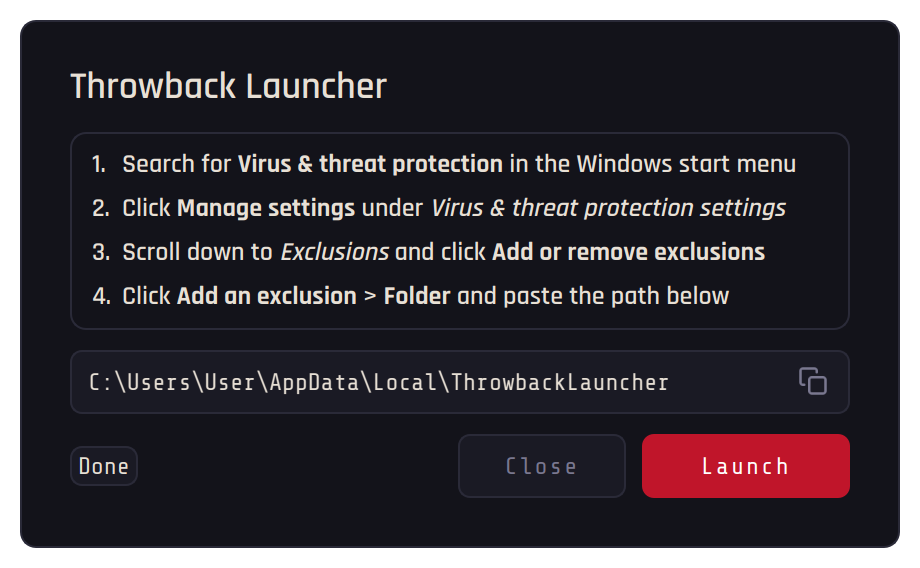
Press Install and follow the steps in the installer. Once the exclusion is added, turn Real-time protection back on and press Launch.
Frequently Asked Questions
Some browsers block downloads that contain executable files. To get around this, follow the steps for your browser.
- Chrome — Open
chrome://downloads, click the three dots next to the blocked entry and select Keep dangerous file - Edge — Click the three dots next to the blocked item and select Keep, and if another warning follows, click Show more and press Keep anyway
- Firefox — Open the downloads panel in the toolbar, click the blocked download and press Allow Download
Windows Security may flag Heated Metal and the Liberator as false positives.
- Search for Virus & threat protection in the Windows Start menu
- Click Manage settings under Virus & threat protection settings
- Scroll down to Exclusions and click Add or remove exclusions
- Click Add an exclusion > Folder and select the Launcher folder and your library folders
Your login is required to access the Steam depot servers, where the old game files are stored. The Launcher uses DepotDownloader, an open-source tool.
Some game files are very large, and the percentage only updates when a file is done. If there is network activity, it is still downloading.
No. Each downloaded season runs on its own, like a separate game.
Need Help?
If you run into issues, check the Common Errors page or visit the How to Get Help page for guidance on reporting problems to staff.