Support
Multiplayer
How to set up and play with others using Radmin VPN.
Radmin VPN Setup
- Download and install Radmin VPN
- Open Network at the top of Radmin VPN and create a network, or join one that your friends are already in
How to Play
- Make sure all players are connected to the same network
- Launch the game and create a local custom game
- Other players can join by selecting Join Local from the main menu
Frequently Asked Questions
Yes. The player with the most stable internet connection should host. If you are experiencing lag, try switching hosts.
- Build — All players must download the same build, which the in-game Show Metrics option confirms
- Network — Make sure all players are connected to the same network and no other VPN is running
- Restart — Try restarting both the game and Radmin VPN
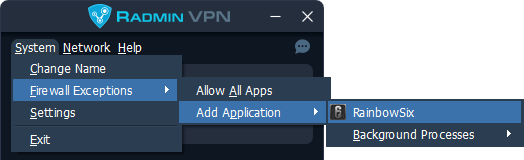
- Firewall — Make sure the old R6S build is allowed through your firewall for both private and public networks